Your security question is used to verify your identity if you ever need to reset your password using the Forgot Password flow.
Working on the Website
- Click the User Profile icon and select Account Settings.
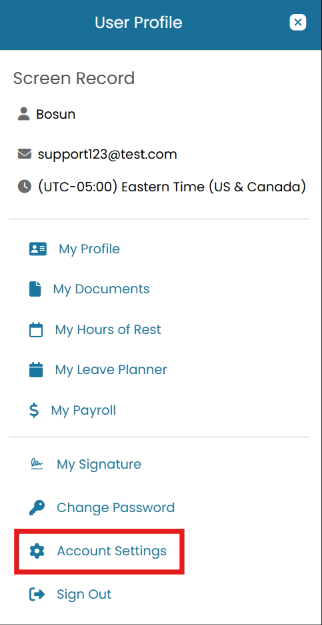
User Profile menu with Account Settings highlighted - Open the Secret Question dropdown and pick a question you'll always remember the answer to. Enter your Answer. Answers are case-insensitive but must match exactly otherwise. Once done, click Submit.
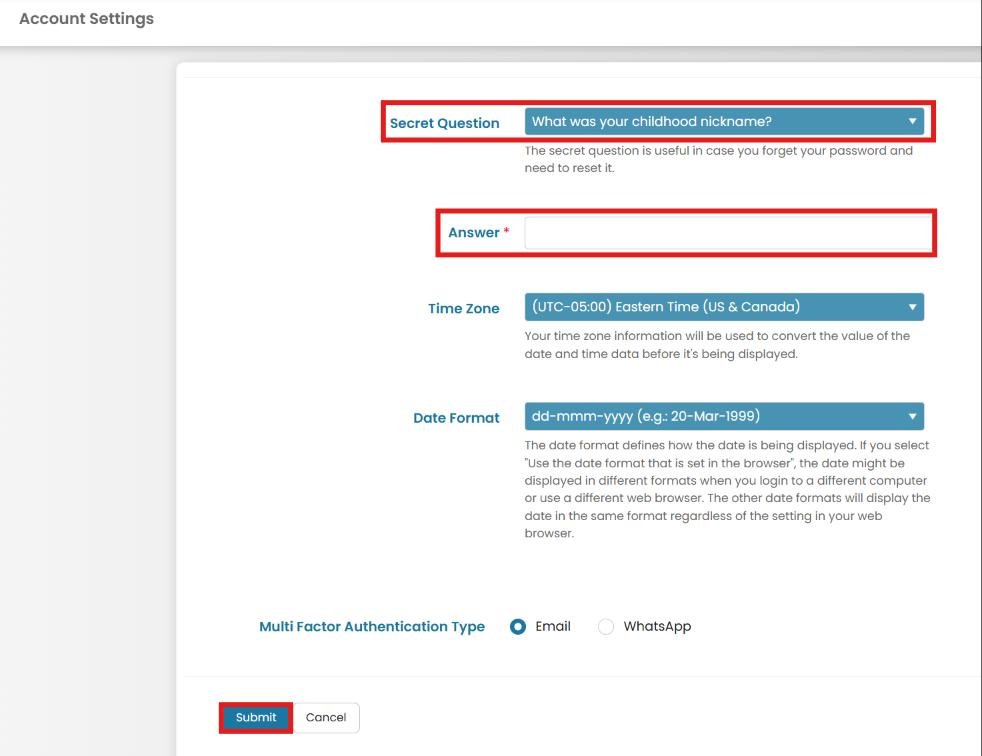
Account Settings form with Secret Question dropdown, Answer field, and Submit button
Working on the MMV App
Update your answer later
Return to Account Settings any time to change your question or answer. There's no limit on how often you can update it.
Common questions
What if I forget the answer?
A senior crew member or officer with the appropriate permissions on your vessel (typically the Captain, Officer, or another user granted the reset-password permission) can reset your password so you can log back in. If no one onboard has that permission, contact your Fleet administrator ashore. Once you're logged back in, go to Account Settings and update your security question and answer yourself — nobody else can change your security question or answer on your behalf.
Can I use any question I want?
No — choose from the preset list in the dropdown. This ensures the recovery flow can display the same question consistently.
Is the answer case-sensitive?
Answers are matched case-insensitively but must otherwise match exactly. Avoid extra spaces.
Still need help?
Our support team will pick it up as a support ticket and reply by email.